What Are AI Powered Glasses and How Do They Work?
Ai-Powered Glasses are wearable computers designed to bring digital assistance into ordinary moments. A tiny camera can read a sign; microphones pick up a spoken question; open-ear speakers deliver an answer without covering your ears. A built-in chip processes simple tasks, while a paired phone or cloud service may handle more demanding AI requests. The exact setup varies by model. Some glasses have displays; others rely on audio and a phone connection.
The market is growing quickly, though growth alone does not prove usefulness. Counterpoint Research reported that global smart-glasses shipments rose 210% year over year in the first half of 2024, with Meta’s Ray-Ban collaboration driving much of the increase. At Meta Connect 2024, CEO Mark Zuckerberg called glasses “the ideal form factor for AI.” That is a notable industry view, not an independent verdict. In practice, convenience depends on clear microphones, dependable connectivity, battery life, and whether the assistant understands the scene correctly. A quiet voice in a busy café can still be missed. Small details matter.
This guide explains what Ai-Powered Glasses contain, how their sensors and AI systems work together, and where processing happens. It also considers everyday uses, limitations, privacy choices, and questions buyers should ask. They are not magic. A camera may misread a label, and a cloud-based answer may arrive slowly. The technology is promising, but its trade-offs deserve a clear-eyed look.
What AI-Powered Glasses Are and How They Differ from Regular Eyewear
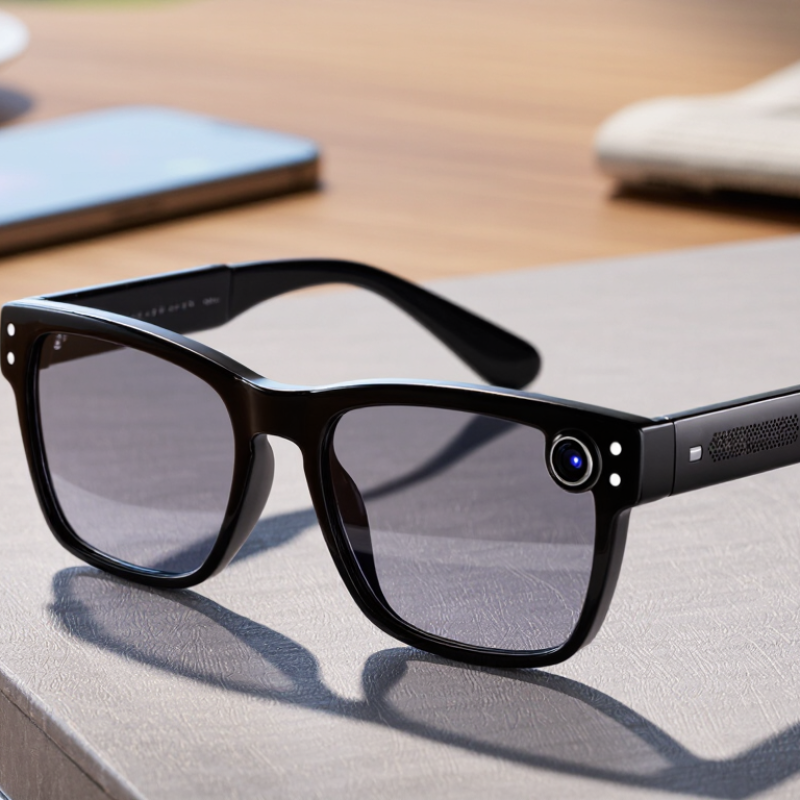
AI-powered glasses resemble ordinary eyewear, but their frames contain small computers, microphones, and sometimes cameras or speakers. These parts let the glasses respond to spoken requests, capture images, or provide audio without requiring you to hold a phone. A voice assistant might read a message aloud while you walk, or identify an object shown through the camera. The exact features vary by model. Some glasses offer only basic voice controls; others can analyze images or connect to navigation and translation tools. They are not magic.
Regular glasses mainly correct vision, protect eyes, or reduce glare. AI-powered versions may do those jobs too, but add software that processes voice, images, or other information. That changes the experience: instead of looking down at a screen, you can receive a brief spoken answer while keeping your hands free. The trade-off is practical. Tiny frames have limited battery space, and noisy streets can make voice commands unreliable. Cameras also raise reasonable questions about when recording is active and whether nearby people know. The boundary between eyewear and computer is not always neat, and useful features can feel awkward in everyday settings.
The Main Components Inside AI-Powered Glasses
AI-powered glasses combine familiar eyewear with small electronic components. A camera or image sensor captures scenes in front of the wearer. Microphones pick up speech and nearby sounds. Some models also include motion sensors that detect head movement or changes in orientation. Small parts, real trade-offs.
A compact processor analyzes sensor data and runs the glasses’ software. It may recognize objects, respond to spoken requests, or create captions. Memory stores software and temporary data, while a battery supplies power to the system. Wireless connections can send information to a nearby phone or online service, depending on the design. Processing does not always happen entirely inside the frames.
The output needs a practical way to reach the wearer. Tiny speakers can play audio, while some designs use a discreet display to show brief text or visual cues. These parts must fit into lightweight frames, so heat, battery life, and comfort can limit performance. A feature that works well indoors may struggle in bright sunlight or a noisy street. The details vary between devices, and technical descriptions do not always explain how much processing happens locally. That distinction matters for privacy and responsiveness. An extra sensor is not automatically useful. The real test is whether the glasses provide clear help without becoming uncomfortable or distracting.
How Glasses Capture and Interpret What the Wearer Sees and Hears
AI-powered glasses combine a small camera, microphones, sensors, and a compact computer. The camera may capture a photo or brief video when the wearer asks a question. Some designs also analyze visual information continuously, depending on their settings. Tiny microphones pick up speech and nearby sounds, while motion sensors help estimate head direction. A status light may signal when recording is active, though its visibility and meaning vary by device.
The software turns these inputs into useful clues. Image recognition can identify a street sign, read a printed label, or describe an object in view. Speech recognition converts spoken words into text, and language software helps interpret the request. For example, a wearer might ask what a sign says while looking toward it. The glasses could capture the sign, extract its lettering, and speak the result through small speakers. Some processing happens on the glasses; other tasks may rely on a connected phone or remote service. Not every feature works offline.
The result depends on clear images and understandable audio. Glare, movement, crowded rooms, or unfamiliar accents can confuse the system. It may misread a number or miss a quiet voice. That matters. AI glasses can feel less seamless in everyday use than a polished demonstration suggests. Their answers are helpful prompts, not guaranteed observations, so important details still deserve a human check.
How AI Turns Data into Information, Assistance, or Actions
AI-powered glasses convert sights and sounds into usable context. A camera captures a sign, object, or view; microphones pick up speech. Software identifies patterns, then combines them with a spoken or typed request. On-device processing can handle quick tasks, while more complex questions may rely on a connected service. The result could be a translated menu, a reminder, or spoken directions. Stanford’s 2025 AI Index reports that inference costs for systems reaching GPT-3.5-level performance fell more than 280-fold from November 2022 to October 2024. That matters. Cheaper processing can make frequent, lightweight assistance more practical, though it does not guarantee accurate answers.
The glasses become useful when they turn raw input into a relevant next step. They might read a meeting-room label aloud or summarize a displayed schedule. Some systems can also trigger actions, such as saving a note, with user permission. GSMA’s Mobile Economy 2024 report counted 1.6 billion 5G connections worldwide at the end of 2023, supporting the broader shift toward connected services. Yet a fast network cannot fix a misunderstood scene. A reflection, accent, or crowded background may confuse the system. It is worth checking important details, and asking whether every captured moment needs to be processed. That tension remains. Data can become assistance, but judgment still belongs to the wearer.
What Are AI-Powered Glasses and How Do They Work?
A typical workflow turns sensor data into useful assistance through four steps.
Cameras, microphones, and other sensors capture information from the wearer’s surroundings. AI interprets that input, generates relevant assistance—such as spoken directions or a description—and may carry out a requested action. The bar heights show workflow order only; they are not performance measurements.
Common Uses, Privacy Considerations, and Current Limitations
AI-powered glasses pair ordinary-looking frames with a camera, microphones, speakers, and compact computing hardware. Software interprets images or spoken requests, then delivers information through audio or a small display. Some tasks run on the glasses; others may send data to remote servers. The details vary by device.
Common uses include hands-free directions, spoken reminders, live captions, and identifying objects in view. A person cooking might ask for a timer while keeping both hands on a mixing bowl. These tools can help, but they are not dependable in every setting. Poor lighting, background noise, or an unfamiliar accent may lead to missed details. Useful, but imperfect.
Privacy deserves attention. A camera or microphone can capture nearby people, not just the wearer. Clear recording indicators and easy controls help, though bystanders may not notice them. That matters. Users should check what gets stored, how long it remains, and whether processing happens locally or online. Current limitations include short battery life, small displays, heat, and occasional recognition errors. Speech may also be difficult in crowded rooms. The technology can feel convenient, but it still asks people nearby to trust a device they may not understand. That tension is easy to overlook.